A customer clicks an advertisement because something caught their attention: a product, a use case, an offer, or a promise. The landing page needs to pick up that conversation immediately.
Shopify landing page optimization is the work of aligning the destination with that intent, answering the questions that stand between interest and purchase, and making the next action clear. It does not always require a separate page-builder app or a completely new template.
This guide focuses on campaign destinations. For the complete research and improvement process, read our Shopify conversion rate optimization guide.
Choose the right destination for the campaign
| Campaign intent | Likely destination | What the page needs to do |
|---|---|---|
| Buy a specific product | Relevant product page | Explain the item and make selection straightforward. |
| Explore a category or curated range | Relevant collection page | Help customers compare and narrow the assortment. |
| Understand a particular use case or offer | Focused campaign landing page | Build the argument and connect it to the appropriate purchase route. |
| Discover the brand broadly | Homepage or suitable editorial destination | Orient the visitor and provide clear routes into the offer. |
Use the simplest destination that can do the job well. A polished custom landing page is not useful if the campaign already names a specific product and the page makes customers search for it again.
Our product-page guide and collection-page guide cover those destinations in more detail.
Make the first screen match the promise
Compare the ad and the destination side by side. Does the page show the same product or range? Is the offer still valid? Does the headline address the reason someone clicked? Are important conditions visible before the customer has to commit?
Imagine a fictional shoe brand running a campaign about a lightweight everyday walking shoe. A landing page opening with an unrelated sale banner and a grid of formal footwear breaks the conversation. A better opening identifies the relevant shoe, shows its intended use, and provides a clear route to choose it.
Use accurate language and imagery. If the ad implies a capability, the product information needs to support it. Strong message match is not an excuse to repeat an unsupported claim more confidently.
Plan the page around purchase questions
Write down what a first-time visitor needs to understand. Then choose the order in which the page answers it.
- Relevance: what is being offered and who it is for.
- Value: why the product or offer is worth considering.
- Understanding: how it works, what is included, and what makes the options different.
- Evidence: credible information that supports the claims.
- Practicalities: price, selection, delivery, returns, and other meaningful conditions.
- Action: the appropriate route to select or buy.
This is a planning sequence, not a requirement to create six large sections. Some products need a short page with clear facts. Others need more explanation. Page length should follow the decision, not a formula copied from another industry.
Show the product in the context that matters
Choose images and video that resolve questions. For the fictional walking shoe, that could mean a clear product view, a close-up of the construction, and an honest view of the shoe being worn. Repeating the same dramatic photograph in several sections adds length without adding understanding.
Plan mobile crops early. A desktop image with generous space beside the subject may become an awkward close-up on a phone. Keep important text as readable page content and verify that it remains legible against the chosen background.
Use our Shopify image preparation guide to brief the asset requirements before the page is approved.
Answer objections with credible information
Identify the questions people ask before buying. Fit, dimensions, compatibility, ingredients, delivery, installation, and returns can matter more than another broad statement about quality.
Use genuine reviews and evidence that relates to the claim beside it. A testimonial about fast shipping does not substantiate a product-performance promise. Do not invent customer quotes, numerical results, countdowns, or scarcity to fill a design section.
Keep answers close to the relevant decision. A size concern belongs near size selection or a clearly accessible guide. An important offer limitation should not be hidden in a footer.
Keep the path focused without hiding useful information
A campaign page should have a clear primary action. Secondary links can still be useful when they answer a necessary question or let someone verify the business. Removing every route to delivery, returns, or contact information can create uncertainty.
Review the combined effect of sticky bars, popups, chat, recommendations, and promotional messages. Each element should earn its place. On mobile, several individually small elements can obscure the product or the buying control.
A repeated call to action is useful when the page is long enough to justify it and the action remains consistent. Avoid changing the promise or destination each time simply to make the layout feel varied.
Build a maintainable page and test the full journey
Decide whether an existing template can support the campaign or whether a distinct template is needed. Be careful with shared templates: static section content can affect other pages using the same arrangement. Shopify's template documentation explains creation, previewing, and assignment.
Test the campaign link, tracking parameters, page loading, product selection, cart, discount behavior, and checkout. Include an expired or ineligible offer if the campaign has those conditions. Confirm the customer sees the intended message rather than an unexplained failure.
Review a real phone and the browsers important to the audience. Our mobile design checklist and speed guide cover common implementation concerns.
Measure the campaign audience and the business result
Keep the campaign's visitors and destination identifiable in reporting. Shopify provides marketing performance reporting; use consistent campaign naming and understand the attribution definitions in the tools you compare.
Look beyond the landing-page click. Review appropriate purchase outcomes, revenue, contribution, and signs of customer confusion. A page that attracts many button clicks but sends people to the wrong product is not a success.
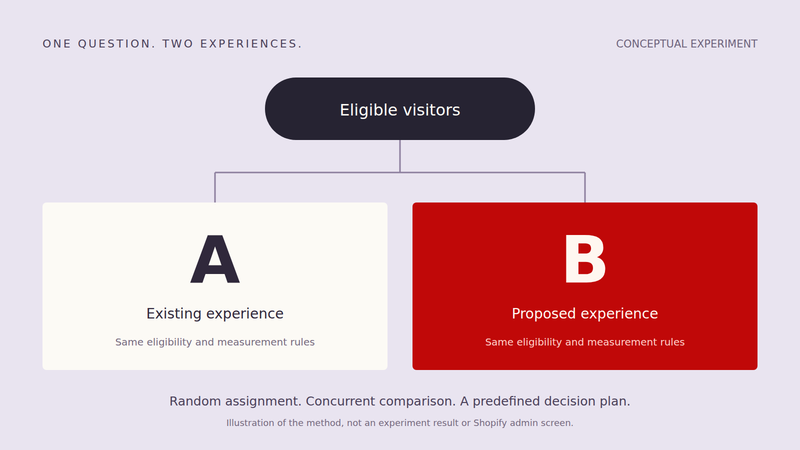
If you compare variants, use a sound A/B test plan. If you compare time periods, note changes in the audience, promotion, inventory, and spend before attributing the difference to the page.
Connect campaign strategy with the shopping experience
A merchant can improve a straightforward campaign destination directly. A studio can coordinate the creative direction, content structure, design, development, and testing while your team focuses on the campaign and the business behind it.
Sugoi Digital builds ecommerce experiences that carry the promise through to the purchase. Work With Us to discuss your next campaign or store improvement.